
API Workflow & Setup
This document describes the standard authorization flow. It explains how to request user consent, obtain access tokens, retrieve consent details, and refresh expired access tokens.
Use this flow for all Premium APIs that require OAuth 2.0 authorization.
For error scenarios, see Try it Out (Sandbox).
Before you begin
Complete the following requirements before using the Authorization Services.
Sandbox Requirements
- Set up a sandbox account
- Set up sandbox application and subscription to:
- Any premium API
- Set up your Mutual TLS connection, you can find our example certificates for sandbox here.
- Set up your signing certificate, example certificates for sandbox here.
Production Requirements
- Set up a production account. To get a production account, see Go to Production
- Set up production application and subscription to:
- Any premium API
- Set up your Mutual TLS connection with your EV SSL certificate
- Set up your signing certificate
Required Headers
Include the following headers where applicable.
| Name | Description | Format |
|---|---|---|
| X-Request-ID | Universally Unique Identifier (UUID) generated by your application. Required for the Consent Details endpoint. | UUID |
| X-IBM-Client-ID | UUID generated by your application. Required for the Consent Details endpoint. | UUID |
| Authorization | HTTP Basic Authentication using a Base64-encoded client_id:client_secret. Required for the token endpoint. | String |
The token endpoint uses request body parameters instead of headers. The authorization endpoint uses query parameters instead of headers.
OAuth Authorization Flow Overview
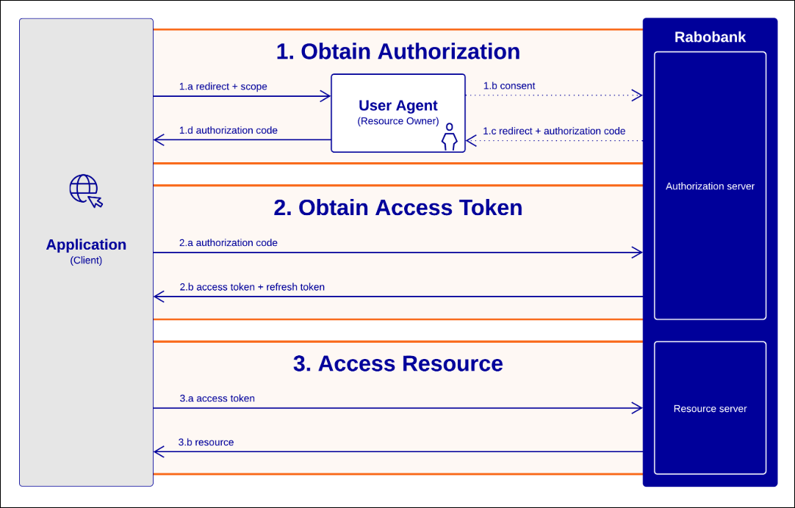
Step 1 - Request user consent
Endpoint:
Authorization code and implicit grantsGET /authorize
Purpose: Request user consent and start the authorization flow.
Required parameters:
| Parameter | Purpose |
|---|---|
| response_type | Use code for the authorization code grant flow. |
| scope | Space-separated list of permissions requested from the user. Request multiple scopes by separating them with spaces. |
| client_id | Value of the X-IBM-Client-ID assigned to your application. |
Optional parameters:
| Parameter | Purpose |
|---|---|
| state | Maintain state between the request and callback. |
| redirect_uri | Required when multiple redirect URIs are configured for your application. The value must exactly match a registered redirect URI. |
After the user grants consent, Rabobank redirects the user to your configured redirect URI with an authorization code.
Consents remain valid until the user revokes them. Users can also revoke consent in Rabobank Business Banking.
Do not embed the Rabobank authorization page in your application. Open it in the user's browser.
Step 2 - Exchange the authorization code for a token pair
Endpoint:
Request Access TokensPOST /token
Purpose: Exchange the authorization code for an access token and refresh token.
Required headers:
| Header | Purpose |
|---|---|
| Authorization | HTTP Basic Authentication using a Base64-encoded client_id:client_secret. |
Required body parameters:
| Parameter | Value |
|---|---|
| grant_type | authorization_code |
| code | Authorization code received from the authorization endpoint |
Optional body parameters:
| Parameter | Purpose |
|---|---|
| redirect_uri | Required when the authorization request included a redirect_uri. The value must match the authorization request exactly. |
The response contains:
access_tokenrefresh_tokenexpires_inrefresh_token_expires_inmetadata
The metadata field contains the consentId. Use this value with the Consent Details Service.
The authorization code is valid for a single use. Exchange it immediately after receiving it.
Step 3 - Access user account
Purpose: Access APIs on behalf of the user with the access token.
Include the access token in the Authorization header of every request:
Authorization: Bearer ACCESS_TOKENUse the access token until it expires.
When the access token expires, continue with Step 4.
Step 4 - Refresh the token pair
Endpoint:
Request Access TokensPOST /token
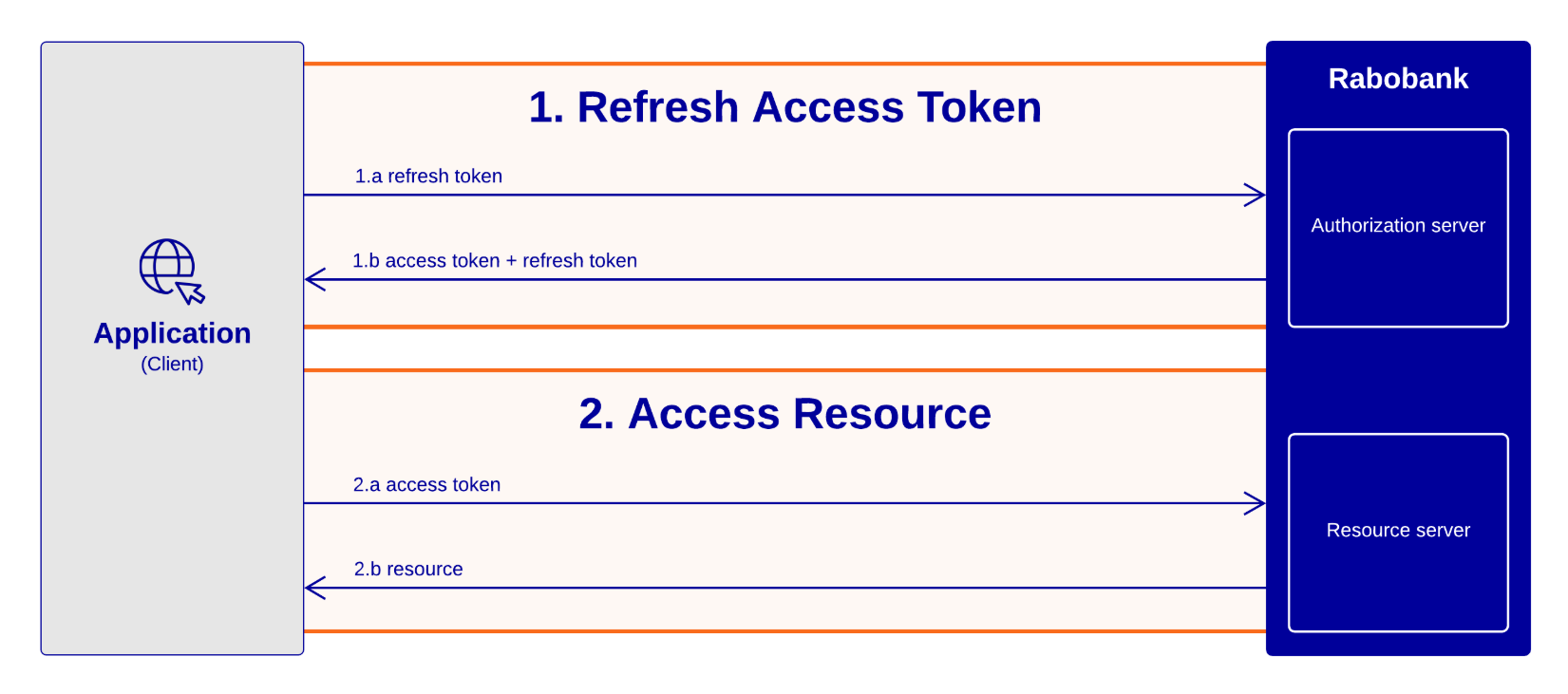
Purpose: Exchange the refresh token for a new access token and refresh token.
Required headers:
| Header | Purpose |
|---|---|
| Authorization | HTTP Basic Authentication using a Base64-encoded client_id:client_secret. |
Required body parameters:
| Parameter | Value |
|---|---|
| grant_type | refresh_token |
| refresh_token | Previously received refresh token |
The response returns:
- New
access_token - New
refresh_token - Expiry times of new tokens
Refresh tokens are single-use. Store the new refresh token returned in each successful refresh response.
After refreshing the token pair, return to Step 3.
This process of using and refreshing tokens is called token management. Proper token management ensures uninterrupted access to protected resources.
Optional next step - Retrieve consent details
Endpoint:
Get consent detailsGET /v1/consents/{consentId}
Purpose: Retrieve details of an existing consent.
Use the consentId from the metadata field in the token response to retrieve:
- Consent status
- Consented scopes
- Associated accounts
- Account status
- Expiry information
Required parameters:
| Parameter | Purpose |
|---|---|
| consentId | Identifier of the consent to retrieve. |
Use this endpoint to verify that a consent is still active or to troubleshoot CONSENT_INVALID responses.
Download API Specifications
Updated about 2 months ago