
Error codes
This page explains the most common OAuth 2.0 errors and how to resolve them.
Authorization
Invalid client ID
HTTP status: 401 Unauthorized
Error message: invalid client id or secret
This error occurs when:
- The client ID is invalid.
- Your Third-Party Provider (TPP) application is not subscribed to an OAuth 2.0 API.
Resolution
- Verify that the client ID is correct.
- Make sure your application is subscribed to an OAuth 2.0 API.
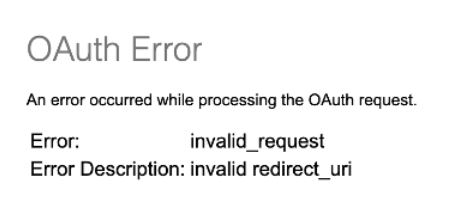
Redirect URI mismatch
The redirect_uri in the authorization request must match a redirect URI registered in the Rabobank Developer Portal.
If the values do not match, authorization fails.
Resolution
- Verify that the
redirect_uriparameter exactly matches a registered redirect URI. - If multiple redirect URIs are registered, use one of the configured values.
Access token request
Invalid authorization code
HTTP status: 400 Bad Request
{
  "error": "invalid_grant"
}
The authorization code is expired, invalid, or has already been used.
Resolution
- Use a valid authorization code.
- Exchange the authorization code within 5 minutes.
- Use each authorization code only once.
Add a 1000 ms delay before calling the token endpoint. This helps synchronize authorization codes across our servers.
Invalid refresh token
HTTP status: 401 Unauthorized
{
  "error": "invalid_grant"
}
The refresh token is invalid, expired, or has already been used.
Resolution
- Use a valid refresh token.
- Use each refresh token only once.
Invalid authorization header
HTTP status: 401 Unauthorized
{
  "error": "invalid_client"
}
The client ID and client secret in the Authorization header do not match the application credentials.
Resolution
- Verify the client ID and client secret.
- Create the Authorization header according to the OAuth PSD2 or Premium API documentation.
HTTP status: 400 Bad Request
{
  "error": "invalid_request"
}
The grant_type parameter is missing or contains an invalid value.
Resolution
- Include the
grant_typeparameter in the request. - Use the correct value:
authorization_codefor authorization code exchange.refresh_tokenfor refresh token exchange.
Resource access
Invalid access token
HTTP status: 401 Unauthorized
{
  "httpCode": "401",
  "httpMessage": "Unauthorized",
  "moreInformation": "This server could not verify that you are authorized to access the URL"
}
The access token is expired or invalid.
Resolution
- Check the access token expiry time.
- Use a refresh token to request a new access token.
- If refreshing fails, verify the consent status using the Consent Details Service API.
- Start a new consent flow if the consent has expired or been revoked.
Invalid consent
A consent is invalid when its status is:
expiredrevokedByPsuterminatedByTppreceivedrejected
HTTP status: 403 Forbidden
{
  "httpCode": "403",
  "httpMessage": "Forbidden",
  "moreInformation": "CONSENT_INVALID"
}
Resolution
- Retrieve the consent using the Consent Details Service API.
- Verify the consent status.
- Start a new authorization flow and collect consent again if the consent is no longer valid.
Expired or revoked consent
Access and refresh tokens may still be active after a consent has expired or been revoked.
This results in a 403 Forbidden error with CONSENT_INVALID.
Resolution
- Check the consent status using the Consent Details Service API.
- Start a new consent flow when required.
Regularly validate consent status to prevent unexpected authorization failures.
Missing required scope
HTTP status: 403 Forbidden
Error message: FORBIDDEN
The access token does not contain the required scope for the API.
Example
An access token with scope paymentRequest cannot access the Account Information API, which requires scopes such as ais.balances.read.
Resolution
- Request the correct scopes during authorization.
- Verify that the required API scope is included in the access token.
Troubleshooting checklist
Authorization issues
- Verify the client ID and client secret.
- Verify the redirect URI configuration.
Token request issues
- Use a valid authorization code.
- Exchange authorization codes within 5 minutes.
- Use authorization codes and refresh tokens only once.
- Include the correct
grant_type.
Resource access issues
- Monitor access token expiry.
- Verify consent status.
- Verify that the access token contains the required scopes.
Updated 2 months ago